Tooltips, price cards and spreadsheet imports, free with a credit line
Pick an item, copy the code and paste it into your guide, blog, wiki or spreadsheet: it shows the live lowest buyout of the Alliance, Horde and Blackwater auction house from 24 WoW Forever auction houses in EU and US. Every snippet starts with a plain link to the item, so it works even where scripts are not allowed.
24auction houses
8platform guides
Freeno key, no sign-up
Plain linkswork without JavaScript
Updated 27 Nov 2026 · API reference on the developer page
1200×630, redrawn every six hours, with the lowest buyout in EU and US. The image links to the item, the line under it credits us.
<a href="https://umbralmarket.com/forever/item/12360-arcanite-bar"><img src="https://umbralmarket.com/forever/og/item/12360.png" width="600" height="315" alt="Arcanite Bar price on the WoW Forever auction house"></a>
<p><a href="https://umbralmarket.com/forever/item/12360-arcanite-bar">Arcanite Bar</a> · Prices by <a href="https://umbralmarket.com/forever">Umbral Market</a></p>
Markdown (GitHub, Reddit, Notion)
[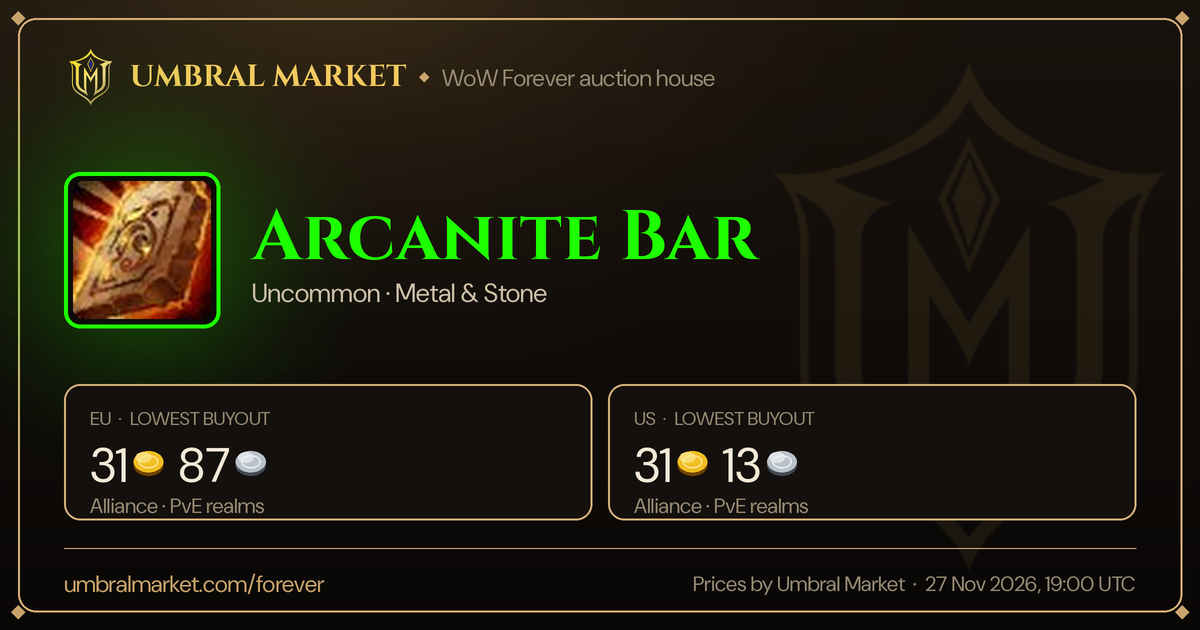](https://umbralmarket.com/forever/item/12360-arcanite-bar)
Prices by [Umbral Market](https://umbralmarket.com/forever)
BBCode (forums)
[url=https://umbralmarket.com/forever/item/12360-arcanite-bar][img]https://umbralmarket.com/forever/og/item/12360.png[/img][/url]
Prices by [url=https://umbralmarket.com/forever]Umbral Market[/url]
Live preview
Live price card in a frame
The three auction houses of one realm type, sales per day and the scan time, at most five minutes old. The line under the frame keeps a plain link for readers and search engines.
<iframe src="https://umbralmarket.com/forever/embed/item/12360?region=eu&realm=pve" width="360" height="250" style="border:0;border-radius:12px" loading="lazy" title="Arcanite Bar price, WoW Forever"></iframe>
<p><a href="https://umbralmarket.com/forever/item/12360-arcanite-bar">Arcanite Bar</a> · Prices by <a href="https://umbralmarket.com/forever">Umbral Market</a></p>
Live preview
Prices in Google Sheets
Paste into a cell. The sheet fills with a header row and the item’s lowest buyout per faction in gold.
Open the CSV · columns: item_id, name, region, realm, alliance, horde, blackwater, lowest, sold_per_day, scanned_utc, url, source. More in the spreadsheet guide.
Step by step for your platform
8 guides
WordPress
Open the post or page, click + and add a Custom HTML block.
Paste the link + tooltip code and publish. The tooltip shows on the published page, not inside the editor.
If WordPress removes the script line when you save (WordPress.com plans without plugins do), the link and the credit stay. For a picture, add an Image block, choose Insert from URL, paste the card address and link it to the item.
In the post editor switch from Compose view to HTML view (the pencil menu at the top left).
Paste the link + tooltip code where the item belongs, switch back and publish.
For the whole blog at once: Layout → Add a Gadget → HTML/JavaScript, paste only the <script> line. Every item link in every post then gets the tooltip.
Type /embed, paste the card address below and click Embed link; drag the corners to about 360 × 250.
If Notion shows a link preview instead of the card, choose Create bookmark with the item link: the bookmark shows the item card image with today’s price.
Notion does not run outside scripts, so hover tooltips do not work there.
Paste the iframe code (it includes the link line), click Next and Insert.
Resize the box to the card. Google Sites runs embed code inside its own frame, so tooltips would stay inside that box; the iframe card fits better.
<iframe src="https://umbralmarket.com/forever/embed/item/12360?region=eu&realm=pve" width="360" height="250" style="border:0;border-radius:12px" loading="lazy" title="Arcanite Bar price, WoW Forever"></iframe>
<p><a href="https://umbralmarket.com/forever/item/12360-arcanite-bar">Arcanite Bar</a> · Prices by <a href="https://umbralmarket.com/forever">Umbral Market</a></p>
wiki.gg, Fandom and other wikis
Wikis do not run outside scripts or frames. Use the wikitext link: it sends readers to the item’s live price page.
In a table of items, put one link per row; the credit can go once under the table.
[https://umbralmarket.com/forever/item/12360-arcanite-bar Arcanite Bar] on the WoW Forever auction house (prices by [https://umbralmarket.com/forever Umbral Market])
Forums, Reddit and GitHub
Forums with BBCode: paste the BBCode card, it shows the image and links to the item.
GitHub READMEs and Markdown sites: paste the Markdown card.
Reddit: post or comment the item link. A link post shows the card as its preview image.
[url=https://umbralmarket.com/forever/item/12360-arcanite-bar][img]https://umbralmarket.com/forever/og/item/12360.png[/img][/url]
Prices by [url=https://umbralmarket.com/forever]Umbral Market[/url]
[](https://umbralmarket.com/forever/item/12360-arcanite-bar)
Prices by [Umbral Market](https://umbralmarket.com/forever)
Discord and Discord bots
In any channel, just paste the item link: Discord shows the card with today’s lowest buyout in EU and US.
Building a bot? Read the JSON API (no key, see the reference) and use the card as the embed image. Keep “Data by Umbral Market” in the footer.
Every snippet here is free for any site, hobby or commercial. Keep the line “Prices by Umbral Market” that comes with it. Building on the JSON API instead? Show a visible link “Data by Umbral Market” to umbralmarket.com/forever. Please do not resell the data or re-publish it as your own price feed. Questions or a project to show us: our Discord.
Questions about embedding
5 answers
How do I show WoW Forever prices on my website?
Paste the “Link + tooltip” code from this page into your page’s HTML. The item link works on its own; the script adds a tooltip with the lowest buyout of the Alliance, Horde and Blackwater auction house when visitors hover it.
Can I import WoW Forever auction house prices into Google Sheets?
Yes. =IMPORTDATA with our CSV address returns the lowest buyout per faction for up to 50 items in one call. Google refreshes imported data about once an hour, which matches how often Blizzard publishes the houses.
Does the widget work on wiki.gg, Fandom or other wikis?
Wikis do not run outside scripts or frames, so use the wikitext link from this page. It points readers to the item’s live price page and credits Umbral Market.
Is the price widget free?
Yes, for any site, hobby or commercial. Keep the credit line “Prices by Umbral Market” that comes with every snippet, and do not resell the data as your own feed.
How fresh are the prices in the tooltip and the widget?
Blizzard publishes each WoW Forever auction house about once an hour; the tooltip reads the latest scan when it opens, the iframe card is at most five minutes old and the image card at most six hours.

